- Support Home
- Knowledge Base
- Subscriber Management
- Exporting Subscribers
- How do I generate an extract of subscribers by activity check targeting?
Related articles
Need some help?
If you have questions or can't find what you're looking for, we're here to help.
Taguchi Support is available 24 hours a day, Monday to Friday.
Create New TicketAPI Version 5
Did you know Taguchi has an API that supports all of the functionality provided by the admin interface and more?
Explore API Documentation
Thanks for your feedback!
How do I generate an extract of subscribers by activity check targeting?
You can extract subscribers by activity check targeting by following below:
The activity ID you choose must have had an activity check run on it previously. The resulting file contains a record for every subscriber that was targeted in the check, including ID, external ID, email, phone, and a column for each segment in the activity indicating which subscribers match which segments.
Find the activity by searching for the activity ID or name in the Global Search or via Campaigns.
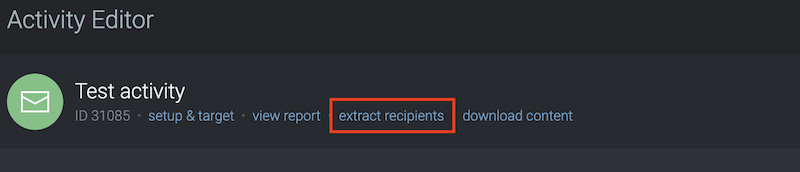
- Click the options menu
("...")located on the bottom right corner of the Activity tile and select the 'Extract Recipients' link.
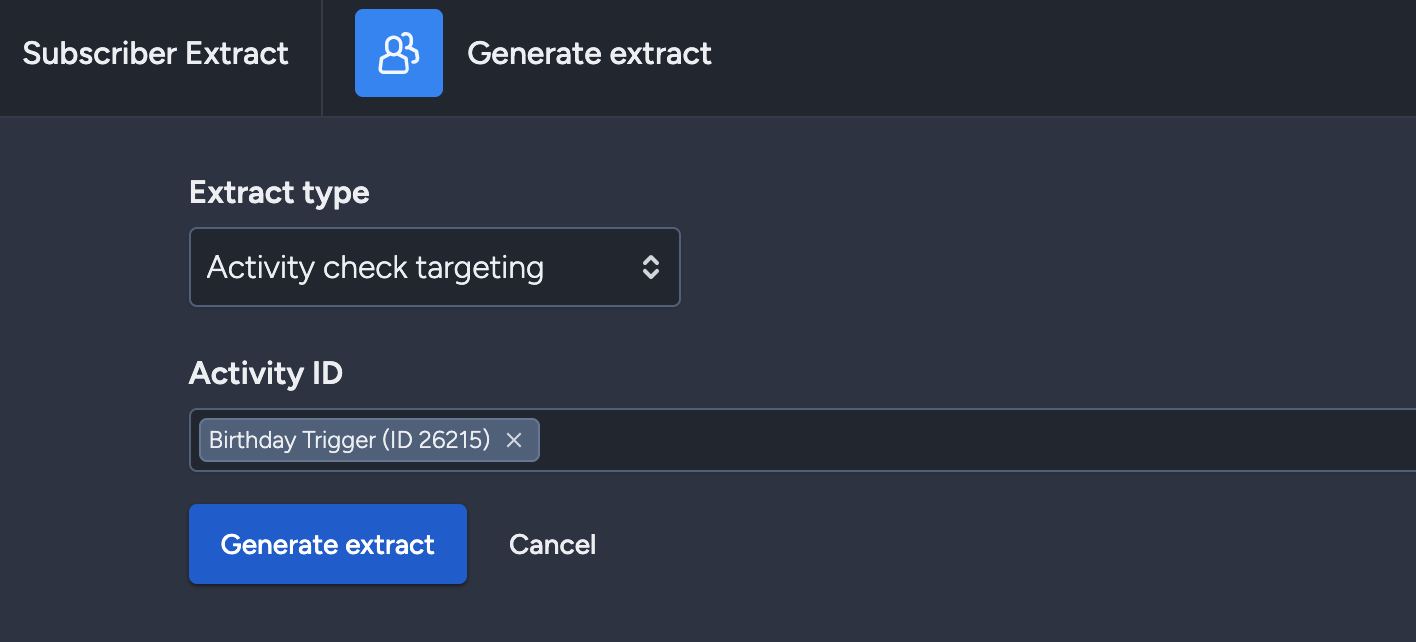
This will bring up the subscriber extract window.
- Click the options menu
- Under 'Extract type', select 'Activity check targeting'.
- Enter the activity ID that you want to extract subscribers from.
- Click 'Generate extract' on the bottom left.